
Reduce Digital Eye Strain and Keep Your Vision Healthy
Many people spend 8 hours or more each day in front of a computer screen, which can lead to digital eye strain, fatigue, headaches, and blurred vision.
Simple changes to your daily routine and workspace setup can help protect your vision and keep your eyes comfortable throughout the workday.

What Is Digital Eye Strain?
Digital eye strain, also known as computer vision syndrome, occurs when your eyes become tired from prolonged screen use.
Common symptoms include:
-
Blurred vision
-
Dry or irritated eyes
-
Headaches
-
Difficulty focusing
-
Neck and shoulder pain
Office workers who spend long hours on computers are particularly at risk.
Follow the 20-20-20 Rule
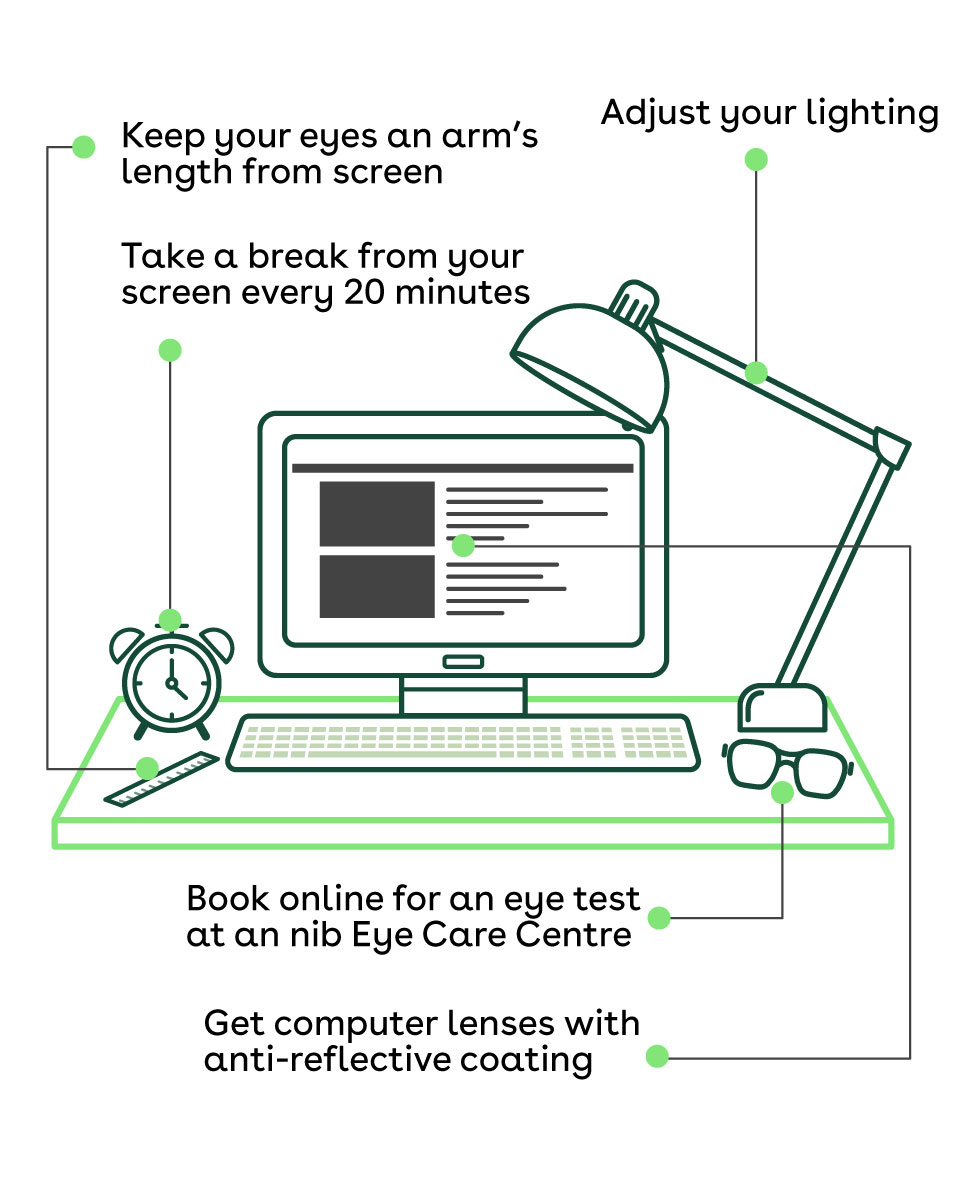
One of the most effective ways to reduce eye strain is the 20-20-20 rule.
Every 20 minutes:
-
Look away from your screen
-
Focus on something 20 feet away
-
For at least 20 seconds
This simple habit allows your eye muscles to relax and helps prevent fatigue.
Adjust Your Computer Screen Position
Proper screen placement can significantly reduce strain on your eyes.
For optimal comfort:
-
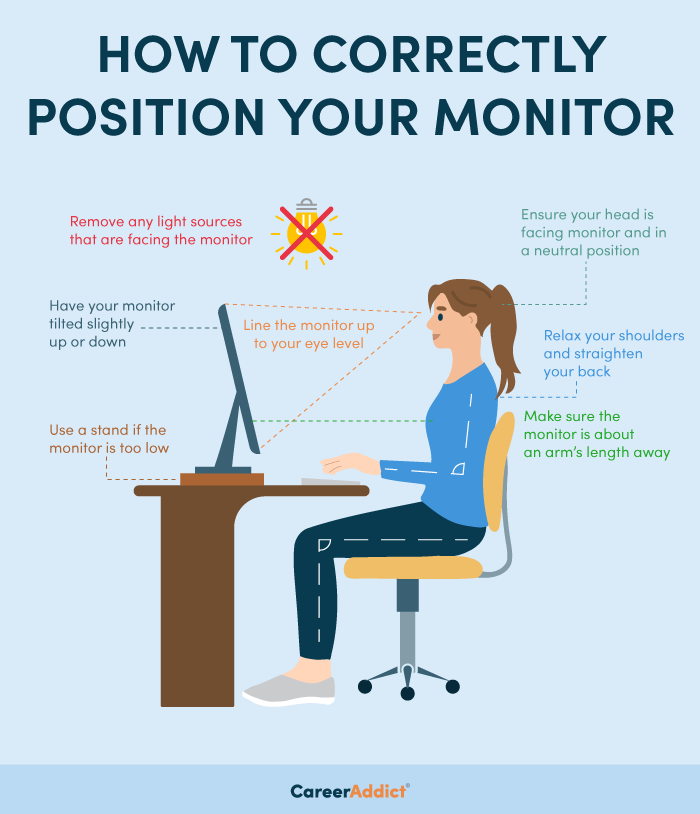
Keep the screen about an arm’s length away
-
Position the top of the monitor at or slightly below eye level
-
Tilt the screen slightly backward
-
Use larger font sizes if necessary
Good workstation ergonomics helps reduce both eye strain and neck discomfort.
Optimize Lighting in Your Workspace
Lighting plays a major role in eye comfort.
Tips for better lighting:
-
Avoid glare from windows or overhead lights
-
Adjust screen brightness to match the room
-
Use desk lamps for softer, controlled lighting
-
Consider anti-glare screen filters
Balanced lighting reduces visual stress and helps prevent eye fatigue.
Blink More Often
People tend to blink less frequently when staring at screens, which can cause dry eyes.
To keep your eyes comfortable:
-
Make a conscious effort to blink regularly
-
Use lubricating eye drops if recommended
-
Take short breaks from screens
Blinking keeps the eye surface hydrated and reduces irritation.
Maintain Proper Office Ergonomics
A well-designed workstation protects both your eyes and posture.
Key ergonomic tips:
-
Sit with your back supported
-
Keep your feet flat on the floor
-
Maintain a comfortable viewing distance from the monitor
-
Keep the keyboard and mouse close to avoid leaning forward
Good ergonomics supports long-term eye and body health.
Schedule Regular Eye Exams
If you work on a computer daily, regular eye exams are essential.
An eye doctor can:
-
Detect vision problems early
-
Update your glasses prescription
-
Recommend computer glasses or blue-light lenses
-
Evaluate symptoms of digital eye strain
Routine eye care helps keep your vision clear and comfortable.
Protect Your Vision at Work
Healthy eye habits can make a big difference in how your eyes feel during the workday.
By following these simple tips—taking breaks, improving lighting, and maintaining proper posture—you can reduce eye strain and protect your long-term vision.
If you experience persistent eye discomfort while working at a computer, consider scheduling a comprehensive eye exam.
FAQ (SEO Rich Snippets)
What causes eye strain when working on a computer?
Eye strain is usually caused by prolonged screen time, poor lighting, improper screen positioning, and reduced blinking.
How can I reduce eye strain at work?
You can reduce eye strain by following the 20-20-20 rule, adjusting your monitor position, improving lighting, and taking regular breaks.
What is the 20-20-20 rule?
The 20-20-20 rule means looking at something 20 feet away for 20 seconds every 20 minutes to relax your eye muscles.
Do computer glasses help with eye strain?
Yes. Computer glasses or blue-light filtering lenses may help reduce digital eye strain for people who spend long hours on screens.
Make your appointment today
To make your appointment, simply give us a call (760)-948-3345 or
or
At Golden Eye Optometry, we view good vision care as front line protection at every age. A routine eye exam can detect more than poor vision. It can shed early light on glaucoma, macular degeneration, cataracts and diabetes.
Information received through Golden Eye Optometry social media channels is for informational purposes only and does not constitute medical advice, medical recommendations, diagnosis, or treatment. Always seek the advice of your eye doctor, physician, or other qualified health provider with any questions you may have regarding a medical condition.


